<?xml version="1.0" encoding="utf-8" ?>
<feed xmlns="http://www.w3.org/2005/Atom" xml:lang="en">

    <title type="text">eeBootstrap</title>
    <link rel="alternate" type="text/html" href="https://www.eebootstrap.com/forum/" />
    <link rel="self" type="application/atom+xml" href="https://www.eebootstrap.com/forum/atom/" />
    <updated>2015-05-04T08:09:00Z</updated>
    <rights>Copyright (c) 2015</rights>
    <generator uri="http://ellislab.com/" version="2.10.1">ExpressionEngine</generator>
    <id>tag:https:,2015:05:03</id>


    <entry>
      <title>eeBootstrap theme 1.0.3 Released.</title>
      <link rel="alternate" type="text/html" href="https://www.eebootstrap.com/forum/viewthread/69/" />      
      <id>tag:https:,2015:/www.eebootstrap.com/forum/viewthread/.69</id>
      <published>2015-05-03T09:16:24Z</published>
      <updated>2015-05-04T08:09:00Z</updated>
      <author><name>eeBootstrap Support Team</name></author>
      <content type="html">
      <![CDATA[
        <p>Today, we are pleased to release eeBootstrap theme 1.0.3</p>

<p>With Version 3.1.19 released April 29, 2015 is added a new conditional variable to forum templates, <strong>&#123;if pm_enabled&#125;</strong>, for conditionally displaying content if private.</p>

<p>More info: <a href="http://www.eebootstrap.com/changelog/">Change Log</a>.</p>


      ]]>
      </content>
    </entry>

    <entry>
      <title>eeBootstrap theme 1.0.2 Released.</title>
      <link rel="alternate" type="text/html" href="https://www.eebootstrap.com/forum/viewthread/56/" />      
      <id>tag:https:,2014:/www.eebootstrap.com/forum/viewthread/.56</id>
      <published>2014-11-12T17:23:35Z</published>
      <updated>2015-05-03T09:17:00Z</updated>
      <author><name>eeBootstrap Support Team</name></author>
      <content type="html">
      <![CDATA[
        <p>Today, we are pleased to release eeBootstrap theme <strong>1.0.2 </strong></p>

<p><strong>- Added img-responsive class for hot linked images in Post.<br />
- Added a envelope icon with unread messages badge in topbar, near the username, if unread messages are present.<br />
- Added the ability to display Post Prefix based on a word in brackets in the Thread Title. (example: [Sunny] the weather today is very good!).<br />
- Added img-responsive class for large thumb attachment.<br />
- Added bbcode to embed Youtube Video in Forum Post.<br />
- Added bbcode to embed Vimeo Video in Forum Post.<br />
- Added bbcode to embed SoundCloud track in Forum Post.<br />
- Added meta tags “meta property” in head to improve the sharing on social networks.</strong></p>

<p>To activate these <strong>features</strong> view <a href="http://www.eebootstrap.com/changelog/">Change Log</a>.</p>
      ]]>
      </content>
    </entry>

    <entry>
      <title>Development updates &#45; SoundCloud track embedded in post.</title>
      <link rel="alternate" type="text/html" href="https://www.eebootstrap.com/forum/viewthread/53/" />      
      <id>tag:https:,2014:/www.eebootstrap.com/forum/viewthread/.53</id>
      <published>2014-11-12T07:20:43Z</published>
      <updated>2014-11-18T15:44:15Z</updated>
      <author><name>eeBootstrap Support Team</name></author>
      <content type="html">
      <![CDATA[
        <p>In the next release will be present the bbcode to embed <strong>SoundCloud</strong> track in post absolutely <strong>RESPONSIVE</strong>, tested on iPhone and iPad.</p>

<p>These are the instructions to embed video in post using <strong>bbcode</strong>: </p>

<div class="codeblock"><code><span style="color: #000000">
<span style="color: #0000BB">&#91;&nbsp;soundcloud&nbsp;&#93;track_url&#91;&nbsp;</span><span style="color: #007700">/</span><span style="color: #0000BB">soundcloud&nbsp;&#93;&nbsp;</span>
</span>
</code></div>
<p><span style="color:red;">Warning: without spaces in the brackets (to avoid the interpretation of the bbcode I had to insert spaces between the brackets)<br />
</span><br />
where <strong>track_url</strong> is the URL track, example: <strong>https://soundcloud.com/party-box-bcn/last-tango-in-paris-lounge-1</strong></p>

<p>This is the result:</p>

<p>[soundcloud]https://soundcloud.com/party-box-bcn/last-tango-in-paris-lounge-1[/soundcloud]</p>
      ]]>
      </content>
    </entry>

    <entry>
      <title>Development updates &#45; Youtube and Vimeo video embedded in post.</title>
      <link rel="alternate" type="text/html" href="https://www.eebootstrap.com/forum/viewthread/47/" />      
      <id>tag:https:,2014:/www.eebootstrap.com/forum/viewthread/.47</id>
      <published>2014-11-11T11:00:46Z</published>
      <updated>2014-11-12T07:28:26Z</updated>
      <author><name>eeBootstrap Support Team</name></author>
      <content type="html">
      <![CDATA[
        <p>In the next release will be present the bbcode to embed <strong>Youtube and Vimeo</strong> video in post absolutely <strong>RESPONSIVE</strong>, tested on iPhone and iPad.</p>

<p>These are the instructions to embed video in post using <strong>bbcode</strong>: </p>

<p><strong>Vimeo:</strong></p>

<div class="codeblock"><code><span style="color: #000000">
<span style="color: #0000BB">&#91;&nbsp;vimeo&nbsp;&#93;video_id&#91;&nbsp;</span><span style="color: #007700">/</span><span style="color: #0000BB">vimeo&nbsp;&#93;&nbsp;</span>
</span>
</code></div>
<p><span style="color:red;">Warning: without spaces in the brackets (to avoid the interpretation of the bbcode I had to insert spaces between the brackets)<br />
</span><br />
where <strong>video_id</strong> is part of URL, example: http://vimeo.com/<strong>79110267</strong></p>

<p><strong>This is the result:</strong><br />
[vimeo]79110267[/vimeo]</p>

<p><strong>Youtube:</strong></p>

<div class="codeblock"><code><span style="color: #000000">
<span style="color: #0000BB">&#91;&nbsp;youtube&nbsp;&#93;video_id&#91;&nbsp;</span><span style="color: #007700">/</span><span style="color: #0000BB">youtube&nbsp;&#93;&nbsp;</span>
</span>
</code></div>
<p><span style="color:red;">Warning: without spaces in the brackets (to avoid the interpretation of the bbcode I had to insert spaces between the brackets)<br />
</span><br />
where <strong>video_id</strong> is part of URL, example: https://www.youtube.com/watch?v=<strong>Q7D8abtLBXw</strong> or http://youtu.be/<strong>Q7D8abtLBXw</strong></p>

<p><strong>This is the result:</strong><br />
[youtube]Q7D8abtLBXw[/youtube]</p>


      ]]>
      </content>
    </entry>

    <entry>
      <title>Development updates &#45; Unread Messages in Top Bar.</title>
      <link rel="alternate" type="text/html" href="https://www.eebootstrap.com/forum/viewthread/46/" />      
      <id>tag:https:,2014:/www.eebootstrap.com/forum/viewthread/.46</id>
      <published>2014-11-11T08:35:47Z</published>
      <updated>1970-01-01T00:00:00Z</updated>
      <author><name>eeBootstrap Support Team</name></author>
      <content type="html">
      <![CDATA[
        <p>in the next release will be present an envelope icon with <strong>unread messages</strong> badge in topbar.</p>

<p>See attached file to preview.</p>
      ]]>
      </content>
    </entry>

    <entry>
      <title>Development updates &#45; Post Prefix.</title>
      <link rel="alternate" type="text/html" href="https://www.eebootstrap.com/forum/viewthread/37/" />      
      <id>tag:https:,2014:/www.eebootstrap.com/forum/viewthread/.37</id>
      <published>2014-11-08T14:05:05Z</published>
      <updated>1970-01-01T00:00:00Z</updated>
      <author><name>eeBootstrap Support Team</name></author>
      <content type="html">
      <![CDATA[
        <p>In the next release will be present the feature <strong>Post Prefix</strong>.<br />
You can see a live example  here -&gt; <a href="http://www.eebootstrap.com/forum/viewforum/7/">Post Prefix</a></p>
      ]]>
      </content>
    </entry>

    <entry>
      <title>Development updates &#45; image hot linked.</title>
      <link rel="alternate" type="text/html" href="https://www.eebootstrap.com/forum/viewthread/28/" />      
      <id>tag:https:,2014:/www.eebootstrap.com/forum/viewthread/.28</id>
      <published>2014-11-06T11:13:27Z</published>
      <updated>2014-11-06T11:25:43Z</updated>
      <author><name>eeBootstrap Support Team</name></author>
      <content type="html">
      <![CDATA[
        <p>In the next release the images hot linked (if allowed) will appear as follows:</p>

<p><img src="http://www.eebootstrap.com/images/made/responsive-in-all-devices.jpg" alt=""  /></p>
      ]]>
      </content>
    </entry>

    <entry>
      <title>eeBootstrap theme 1.0.1 Released.</title>
      <link rel="alternate" type="text/html" href="https://www.eebootstrap.com/forum/viewthread/18/" />      
      <id>tag:https:,2014:/www.eebootstrap.com/forum/viewthread/.18</id>
      <published>2014-11-05T13:36:50Z</published>
      <updated>2014-11-12T17:01:07Z</updated>
      <author><name>eeBootstrap Support Team</name></author>
      <content type="html">
      <![CDATA[
        <p>Today, we are pleased to release eeBootstrap theme <strong>1.0.1 </strong></p>

<p><strong>Added the ability to display an image based on forum ID in forums index page.</strong><br />
To activate this feature see the <a href="http://www.eebootstrap.com/forum/viewthread/39/">instructions</a>.</p>

<p><a href="http://www.eebootstrap.com/changelog/">Change Log</a>.</p>


      ]]>
      </content>
    </entry>

    <entry>
      <title>eeBootstrap theme 1.0.0 Released.</title>
      <link rel="alternate" type="text/html" href="https://www.eebootstrap.com/forum/viewthread/7/" />      
      <id>tag:https:,2014:/www.eebootstrap.com/forum/viewthread/.7</id>
      <published>2014-11-02T10:54:33Z</published>
      <updated>2014-11-10T07:40:09Z</updated>
      <author><name>eeBootstrap Support Team</name></author>
      <content type="html">
      <![CDATA[
        <p>Today, we are pleased to release <strong>eeBootstrap theme 1.0.0 </strong></p>

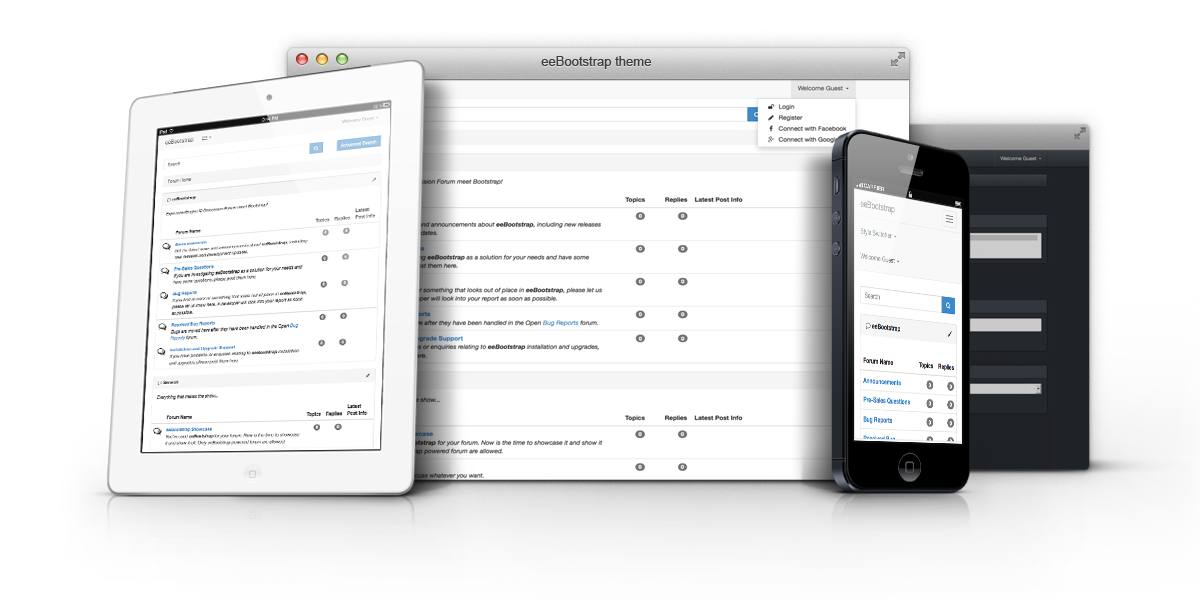
<p>eeBootstrap is a professional theme for ExpressionEngine Forum Discussion Module, it’s developed with the latest version of Twitter Bootstrap framework, HTML5 e CSS3.</p>

<p>eeBootstrap is compatible with the recent version of Internet Explorer, Firefox, Safari, Opera and Google Chrome web browsers.</p>

<p>eeBootstrap theme changes based on the size and capabilities of the device that you use. Your users will be happy to read and write on the forum even from a smartphone!</p>

<p>With the code clean and fully optimized, HTML5 &amp; CSS3 Validated, without any graphic file, your forum will be loaded faster and your users will notice this immediately!</p>

<p><strong>Credit</strong><br />
This release is coded using:</p>

<p>- <a href="http://jquery.com/"> jQuery v1.11.1 </a><br />
- <a href="http://getbootstrap.com/">Bootstrap v3.3.0</a><br />
- <a href="http://bootstrapvalidator.com/">BootstrapValidator v0.5.1</a><br />
- <a href="https://github.com/amazingSurge/jquery-scrollToTop"> jQuery scrollToTop - v0.3.0</a><br />
- <a href="https://github.com/carhartl/jquery-cookie">jQuery Cookie Plugin v1.4.0</a><br />
- <a href="http://markusslima.github.io/bootstrap-filestyle/">Bootstrap FileStyle v1.1.2</a><br />
- <a href="http://lokeshdhakar.com/projects/lightbox2/">Lightbox v2.7.1</a><br />
- <a href="http://fortawesome.github.io/Font-Awesome/icons/"> Font Awesome 4.2.0</a></p>

<p><a href="http://www.eebootstrap.com/changelog/">Change Log</a></p>
      ]]>
      </content>
    </entry>


</feed>